There is updated implementation coming up in another post, which uses modern implementation,
but end of the day the idea is same.
The Background:
As per my experience, in every work environment, in the beginning, speed is everything. Multiple developers fire up different projects, spinning up microservices, automation scripts, and data pipelines.
But as the ecosystem grows, a pattern emerges. Developers start solving the exact same foundational problems over and over again. They copy, paste, tweak, and repeat.
Suddenly, the team is spending more time writing boilerplate infrastructure code than actual business logic.
Looking at the project requirements and development works, I observed, developers independently writing custom code for the exact same core utilities:
-
Database Orchestration: Connecting to instances and executing queries.
-
API Management: Handling authentication, GET, POST, PATCH, and error handling.
-
File Operations: Managing storage, directories, and handling format conversions (JSON to CSV, Excel to CSV, etc.).
-
Security & Crypto: Managing SFTP transfers, encryption/decryption routines, and handling sensitive keys.
-
Core Utilities: String sanitization, sending email notifications, and configuring runtime logging.
When every developer builds their own version of these utilities, it has created a massive amount of technical debt.
The Fallout
This has resulted in severe operational and security risks:
-
Fragmented Codebases: The same logic exists in ten different flavors across fifty different repositories.
-
Security Vulnerabilities: Hardcoded credentials slip through, configuration files (.ini, .env) multiply uncontrollably, and encryption keys end up scattered across various servers.
-
The Maintenance Nightmare: If an API endpoint changes, an auth rule rotates, or a database password updates, it triggers an extensive, multi-repository refactoring nightmare.
-
Observability Black Hole: With no centralized logging standard, tracking down a cross-service bug requires digging through stray log files scattered across different environments
The Solution: Building a Centralized Python SDK
Instead of letting every project dictate its own rules, the solution is to treat your internal tooling like a product.
The idea was simple: Build a proprietary, centralized Python library that acts as an internal SDK for your developers.
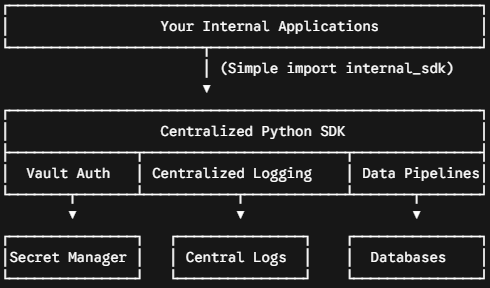
The Work:
First we need to decide on the Security setup, where will all the connection (database, api, ftp path, certificate path, key path and key names.. etc) will be stored.
a. Approach 1:
- create a .ini file, place the file in a secure location
- Limit the access to .ini file only to authorized users, including the system user which will execute the script (this is different than the person running it manually)
- Add the path to the .ini file to System Variables - so that py script can access it as env variable
b. Approach 2:
- Store all the required values in Secure vault (azure, gcp, aws.. etc)
- Add the system user as authorized user - the authenitication and authorization is done at run time and the values are accessed.
In my experice, both approach are good and scalable. They both have there own pros and cons, but the security and integrity is ensured.
| Strategy | Best For | The Hidden Catch |
| Approach 1 (.ini via System Var) | Legacy on-prem VMs static infrastructure quick setups. |
Harder to rotate secrets configuration drifts easily across multiple servers. |
| Approach 2 (Cloud Secret Vault) | Ephemeral containers cloud-native apps auto-scaling groups. |
Introduces runtime latency for API lookup calls requires managed identity IAM roles. |
Libraries required: setuptools
from setuptools import setup, find_packages
File Structure that i used, these can be merged or more segregated as required. But setup.py is required, it's the main file and should be present in the root folder.
setup.py: In this file we declare the name, version, and list out all the external packs that are required. The external pack can contain your organization's all required packs, and indirectly you can control the installation from this place, so that individual developers do not end up accidentaly installing to their own account and not in system account resulting in migration and other control issues.
By pinning core dependencies (like 'pandas' or 'sqlalchemy') directly inside 'install_requires', you centrally control package versions across the organization. This prevents developers from introducing mismatched library versions that cause subtle runtime bugs when deployed to production.
setup(
    name="custom_lib",
    version="0.6",
    packages=find_packages(),
    install_requires=[
        # "pandas",
        # "sqlalchemy",
        # "lxml",
        # "tenacity",
        # "rapidfuzz",
        # "openpyxl"
    ],
)
Example, File and Folder structure (striked out unwanted files):
CUST_LIB ├── .vscode ├── cust │ ├── __pycache__ │ ├── __init__.py │ ├── api.py │ ├── config_loader.py │ ├── database.py │ ├── encdec.py │ ├── excelwriter.py │ ├── filemgmt.py │ ├── geocode.py │ ├── jsontools.py │ ├── logwriter.py │ └── sanitize.py ├──cust.egg-info├──.ini├──ini.py└── setup.py
Each of this files are individual utilities, that are coded for specific purpose. For example the database.py is for connecting to database and execute query.
- api.py - util to connect to api, authenticate and return the response
- database.py - util to connect to database and return the dataframe
-
There is a trap here,
Returning a raw pd.DataFrame(df) forces the entire dataset into memory immediately.
If a developer needs to stream millions of rows via chunks,
the custom wrapper blocks them unless you write even more wrapper code
-
- encdec.py - util to encode decode strings
- excelwrite.py - util to convert dataframe/csv/json/text to excel
- filemgmt.py - util to copy, move, delete file(s)/folder(s)
- jsontools.py - util to parse any json and convert to csv or xml
- logwriter.py - util to be used in all other utils to write centralised logs
- sanitize.py - util to sanitize strings.
Installing the library
# For local development editable mode
pip install -e .

# Or distributing via a shared network drive / private git repo
pip install git+https://git.yourorg.com/architecture/custom_lib.git@v0.6
config_loader.py - is used to read the .ini file using os.environ.get('SYS_VAR_NAME') , do some environment valitdation. This is imported into each individual files.
def get_custom_lib_config():
    path_variable = os.environ.get('ENV_DETAILS')
    if not path_variable or not os.path.exists(path_variable):
        raise EnvironmentError(f"ENV_DETAILS path '{path_variable}' is invalid or missing.")
    config = configparser.ConfigParser()
    config.read(path_variable)
    # get the env
    intended_env = config.get('SETTINGS', 'ENV', fallback='').lower().strip()
    actual_hostname = socket.gethostname().lower()

    # check mapping dev -> sys01, prod -> sys02
    if intended_env == 'prod' and 'sys01' not in actual_hostname:
        raise RuntimeError(f"CRITICAL: INI is PROD but Host is {actual_hostname}")

    if intended_env == 'dev' and 'sys02' not in actual_hostname:
        raise RuntimeError(f"CRITICAL: INI is DEV but Host is {actual_hostname}")

    # Ensure sections....
    required_sections = ['SETTINGS', 'DATABASE', 'DATABASE_CRED']
    for section in required_sections:
        if section not in config:
            raise KeyError(f"Missing required section [{section}] in {path_variable}")

    return config

org_config = get_custom_lib_config()
Here I have implemented the environment check, so that the developer is using the correct library in correct environment, so that correct connections and credentials are used.
if intended_env == 'prod' and 'sys01' not in actual_hostname:
database.py
from .config_loader import org_config

class DBManager:
    def __init__(self, use_ods=False):
        # 1. Fetch Debug Setting
        self.debug = org_config.get('SETTINGS', 'DEBUG', fallback='N').upper() == 'Y'
        self.env = org_config.get('SETTINGS', 'ENV', fallback='dev').upper() == 'prod'
        self.logger = LogWriter(logtype='Lib')

        # 2. Setup Credentials
        if self.env == 'prod':
            cred = org_config['DATABASE_CRED']
            db_sect = org_config['DATABASE']
        else:
            cred = org_config['DEV_DATABASE_CRED']
            db_sect = org_config['DEV_DATABASE']

        user = cred['DB_USERNAME']
        pwd = cred['DB_PWD']
        url = cred['DB_URL']

        # Determine target DB name
        self.main_db = db_sect['DB_ODS_DATABASE'] if use_ods else db_sect['DB_DATABASE']

        safe_pwd = quote_plus(pwd)
        self.base_conn_str = f"mssql+pyodbc://{user}:{safe_pwd}@{url}/{{db_name}}?driver=ODBC+Driver+17+for+SQL+Server"

        # Cache for engines
        self._engines = {}

        # if self.debug:
        self.logger.write_log(f"Initialized DBManager for DB: {self.main_db}")
        self.logger.write_log(f"Host URL: {url}")

    def _get_engine(self, db_name):
        if db_name not in self._engines:
            conn_str = self.base_conn_str.format(db_name=db_name)
            # if self.debug:
            self.logger.write_log(f"Creating new engine for {db_name}")
            self._engines[db_name] = sal.create_engine(conn_str)
        return self._engines[db_name]

    @_db_retry
    def select_query(self, query, db_name=None):
        target_db = db_name or self.main_db
        engine = self._get_engine(target_db)

        self.logger.write_log(f"Executing Select on {target_db}:\n{query}")

        with engine.connect() as conn:
            df = pd.read_sql_query(text(query), conn)
            return pd.DataFrame(df)

    @_db_retry
    def execute_action(self, query, listflag='N', db_name=None):
        target_db = db_name or self.main_db
        engine = self._get_engine(target_db)

        row_count = 0
        with engine.begin() as conn:
            if listflag == 'Y' and isinstance(query, list):
                self.logger.write_log(f"Executing batch of {len(query)} queries on {target_db}")
                for q in query:
                    result = conn.execute(text(q))
                    row_count += result.rowcount
            else:
                self.logger.write_log(f"Executing Action on {target_db}:\n{query}")
                result = conn.execute(text(query))
                row_count = result.rowcount

        return row_count
Use in actual script
from custom_lib.database import DBManager
#Attempt to initialize
db = DBManager(use_ods=True)
# Attempt a simple query
df = db.select_query("SELECT TOP 5 * FROM table_name")
print(df.head())